
Branding & Custom Domain
Configure visual identity, academy logo, color palette, favicon, and bind your custom top-level domain.
Make the academy entirely your own brand. Connect your custom domain (e.g. quran.academy) and establish an authoritative, distinguished presence.
Detailed Implementation Steps
Upload Logo & Visual Assets
Upload your high-resolution academy logo, dark/light variations, and browser favicon in the settings portal.
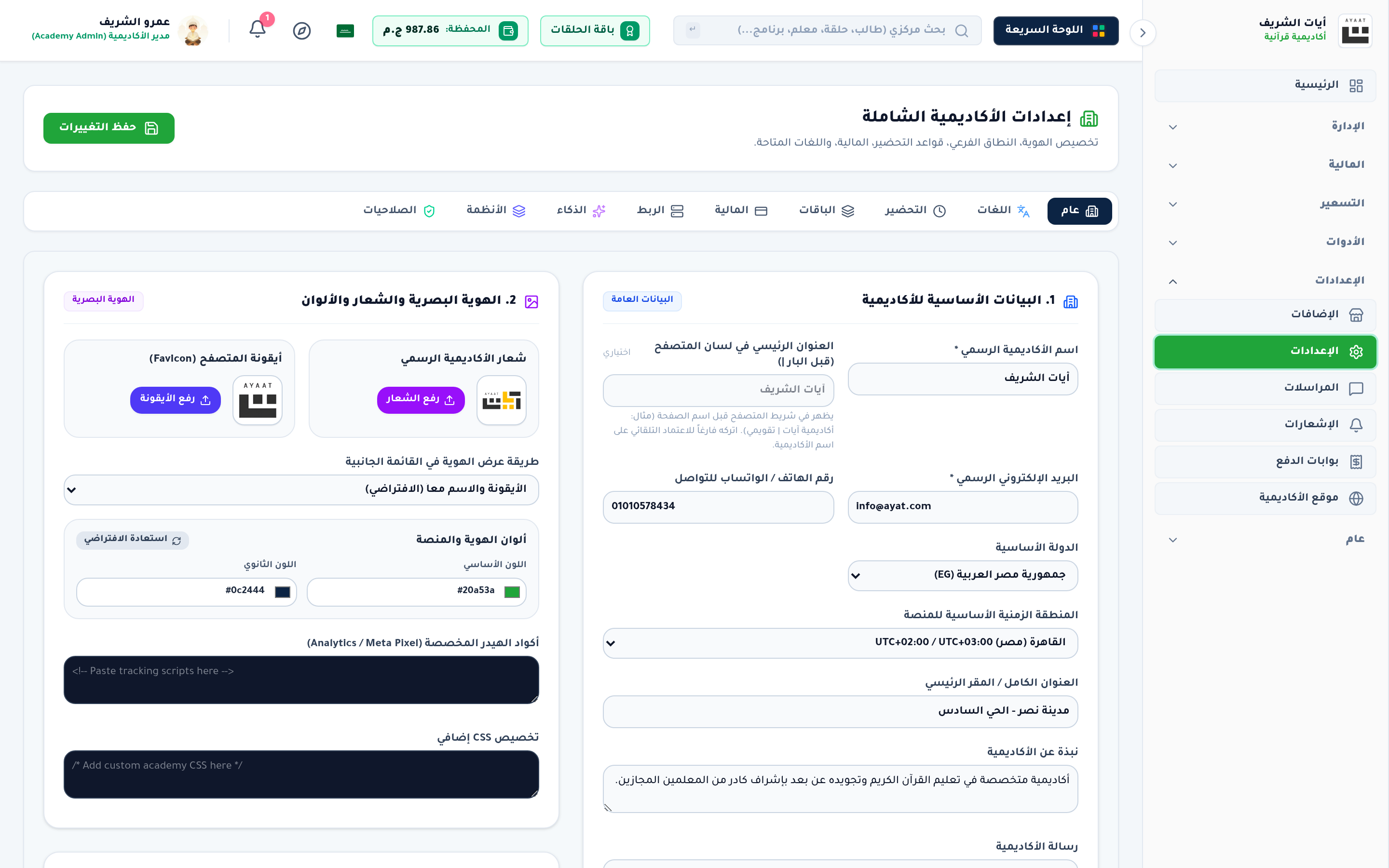
Figure (1): Branding and identity settings
Choose Color Palette & Theme
Select your primary and accent brand colors to dynamically harmonize the student portal, public landing pages, and email templates.
Choose contrasting shades that provide high readability and an elegant Islamic aesthetic.
Connect Custom Domain (DNS Setup)
Enter your domain name (e.g., learn.myacademy.com) and point your DNS CNAME/A records to Huffuz servers for automatic SSL certificate provisioning.
- Add a CNAME record pointing to proxy.huffuz.com.
- Wait 5-15 minutes for worldwide DNS propagation and automated SSL issuance.
- Test your custom domain in an incognito window to verify seamless operation.
قد تستغرق عملية انتشار سجلات DNS الجديدة ما بين 15 دقيقة إلى 24 ساعة كحد أقصى عالمياً.