
Teacher Registration
Methods for onboarding teachers via manual entry, self-registration links, or direct import with role permission configuration.
A comprehensive guide on assembling your academy's teaching faculty, activating their accounts, and precisely defining their supervisory and financial settings with ease.
Detailed Implementation Steps
Navigate to the Teachers Section
From the admin dashboard sidebar, click on “Teachers” to access the teaching faculty management interface, active teachers list, and new applicant requests.
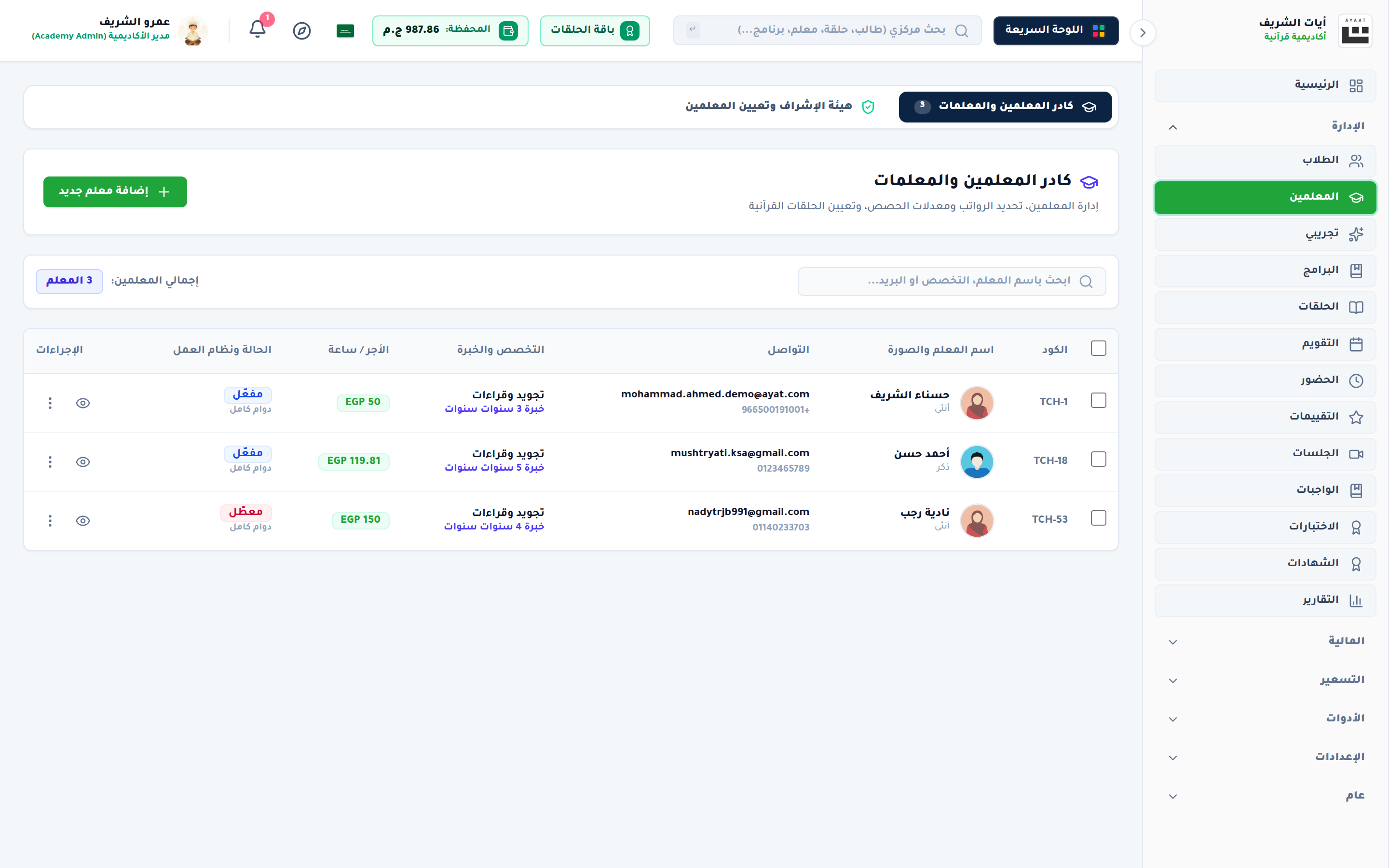
Figure (1): Teachers list view - Academy teaching faculty
Methods to Add Teachers
The platform provides two convenient methods for adding teachers to your academy:
- Manual Addition: Click “Add New Teacher” and enter the name, email, phone number, Quranic specialization, and a temporary password.
- Self-Registration Link: Copy your academy's direct onboarding link and share it with prospective teachers to fill in their details and qualifications, which you can then review and approve.
Teachers can log in independently as soon as their account is approved, with no additional technical setup required.
Permissions and Payroll Configuration
Specify whether the teacher has the “Halaqah Supervisor” role to oversee other teachers, and set their hourly rate or percentage share to ensure automatic payroll and wallet calculations.