
Branding & Website
5 min read
Storefront BuilderAcademy Website Builder
Build, customize, and publish stunning landing pages and student storefronts using the drag-and-drop page builder.
About this Guide
Create modern, responsive marketing pages for your academy without writing code. Showcase courses, teachers, testimonials, and enrollment packages.
Detailed Implementation Steps
1
Step 1 of 3
Select a Template
Choose from pre-designed, responsive Islamic academy templates optimized for conversions and student enrollments.
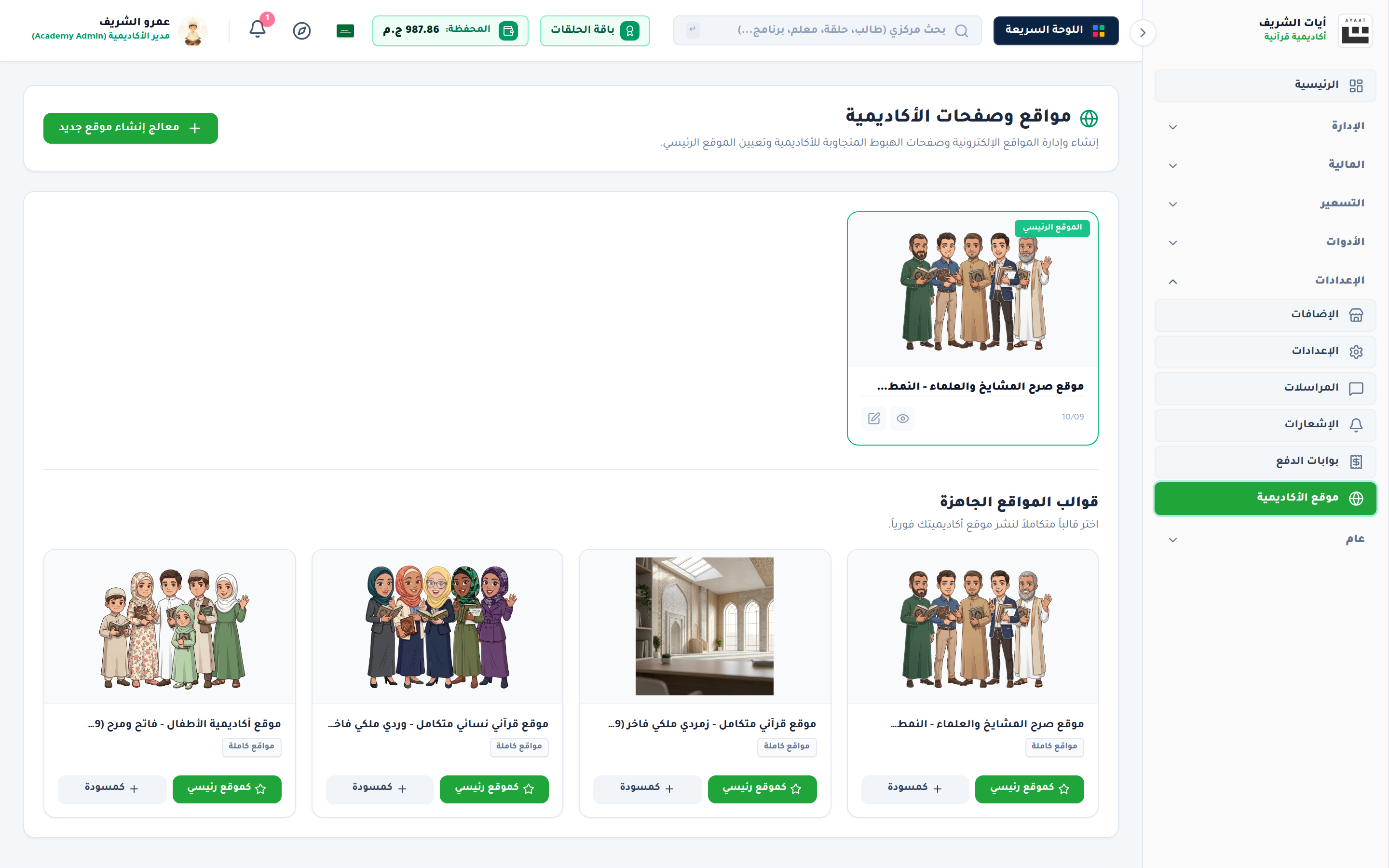
Zoom Screenshot
Figure (1): Website builder template gallery
2
Step 2 of 3
Customize Sections & Content
Use the live visual editor to modify hero banners, teacher showcases, pricing packages, FAQs, and contact forms.
- Edit text, headlines, and call-to-action buttons in real time.
- Rearrange section order with intuitive drag-and-drop controls.
- Switch between mobile, tablet, and desktop preview viewports.
Pro Tip:
Every section automatically adapts to light and dark modes and supports multi-language translations.
3
Step 3 of 3
Publish to Live Domain
Click Publish to instantly make your custom website live on your primary academy domain and subdomain.
Related Articles & Learning Tracks
Recommended steps and paths for your academy
Were these instructions clear and helpful to you?Your feedback helps us continuously improve platform documentation.